ALAT dan BAHAN :
10 Buah PC, 5
Buah Switch, 5 Buah Router, 3 Buah Kabel Serial, 16 Buah Kabel Straight
PENGATURAN PC :
Pilih / klik PC yang akan disetting dan atur seperti di bawah ini.
PENGATURAN ROUTER :
Pilih / klik router yang akan disetting, dalam hal ini misal router0, maka muncul kotak dialog seperti ini :
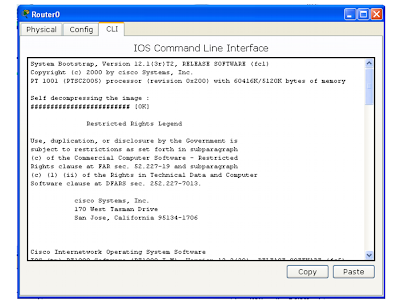 Ketik no
terus enter
Ketik perintah di bawah ini sesuai router yang terpilih.
1. ROUTER0
Router>ena
Router#conf t
Enter configuration commands, one per line.
End with CNTL/Z.
Router(config)#int fa0/0
Router(config-if)#ip add 205.7.5.1 255.255.255.0
Router(config-if)#no shut
%LINK-5-CHANGED: Interface FastEthernet0/0, changed state to up
%LINEPROTO-5-UPDOWN: Line protocol on Interface FastEthernet0/0, changed
state to up
Router(config-if)#exit
Router(config)#int fa1/0
Router(config-if)#ip add 192.5.5.1 255.255.255.0
Router(config-if)#no shut
%LINK-5-CHANGED: Interface FastEthernet1/0, changed state to up
%LINEPROTO-5-UPDOWN: Line protocol on Interface FastEthernet1/0, changed
state to up
Router(config-if)#exit
Router(config)#int ser2/0
Router(config-if)#ip add 201.100.11.1 255.255.255.0
Router(config-if)#clock rate 64000
Router(config-if)#no shut
%LINK-5-CHANGED: Interface Serial2/0, changed state to down
Router(config-if)#exit
Router(config)#ip route 0.0.0.0 0.0.0.0 ser2/0
Router(config)#exit
Router#
%SYS-5-CONFIG_I: Configured from console by console
Router#^Z
Router#wr mem
Building configuration...
[OK]
Router#
2. ROUTER1
Router>ena
Router#conf t
Enter configuration commands, one per line.
End with CNTL/Z.
Router(config)#int fa0/0
Router(config-if)#ip add 219.17.100.1 255.255.255.0
Router(config-if)#no shut
%LINK-5-CHANGED: Interface FastEthernet0/0, changed state to up
%LINEPROTO-5-UPDOWN: Line protocol on Interface FastEthernet0/0, changed
state to up
Router(config-if)#exit
Router(config)#int ser3/0
Router(config-if)#ip add 201.100.11.2 255.255.255.0
Router(config-if)#no shut
%LINK-5-CHANGED: Interface Serial3/0, changed state to up
Router(config-if)#exit
Router(config)#
%LINEPROTO-5-UPDOWN: Line protocol on Interface Serial3/0, changed state to
up
Router(config)#ip route 0.0.0.0 0.0.0.0 ser3/0
Router(config)#^Z
Router#
%SYS-5-CONFIG_I: Configured from console by console
Router#wr mem
Building configuration...
[OK]
Router#conf t
Enter configuration commands, one per line.
End with CNTL/Z.
Router(config)#int ser2/0
Router(config-if)#ip add 199.6.13.1 255.255.255.0
Router(config-if)#clock rate 64000
Router(config-if)#no shut
%LINK-5-CHANGED: Interface Serial2/0, changed state to down
Router(config-if)#exit
Router(config)#ip route 0.0.0.0 0.0.0.0 ser2/0
Router(config)#^Z
Router#
%SYS-5-CONFIG_I: Configured from console by console
Router#wr mem
Building configuration...
[OK]
Router#
3. ROUTER2
Router>ena
Router#conf t
Enter configuration commands, one per line.
End with CNTL/Z.
Router(config)#int fa0/0
Router(config-if)#ip add 223.8.151.1 255.255.255.0
Router(config-if)#no shut
%LINK-5-CHANGED: Interface FastEthernet0/0, changed state to up
%LINEPROTO-5-UPDOWN: Line protocol on Interface FastEthernet0/0, changed
state to up
Router(config-if)#exit
Router(config)#int ser2/0
Router(config-if)#ip add 199.6.13.2 255.255.255.0
Router(config-if)#no shut
%LINK-5-CHANGED: Interface Serial2/0, changed state to up
Router(config-if)#
%LINEPROTO-5-UPDOWN: Line protocol on Interface Serial2/0, changed state to
up
Router(config-if)#^Z
Router#
%SYS-5-CONFIG_I: Configured from console by console
Router#wr mem
Building configuration...
[OK]
Router#conf t
Enter configuration commands, one per line.
End with CNTL/Z.
Router(config)#int ser3/0
Router(config-if)#ip add 204.204.7.1 255.255.255.0
Router(config-if)#clock rate 64000
Router(config-if)#no shut
%LINK-5-CHANGED: Interface Serial3/0, changed state to down
Router(config-if)#exit
Router(config)#ip route 0.0.0.0 0.0.0.0 ser2/0
Router(config)#ip route 0.0.0.0 0.0.0.0 ser3/0
Router(config)#^Z
Router#
%SYS-5-CONFIG_I: Configured from console by console
Router#wr mem
Building configuration...
[OK]
Router#
4. ROUTER3
Router>ena
Router#conf t
Enter configuration commands, one per line.
End with CNTL/Z.
Router(config)#int fa0/0
Router(config-if)#ip add 210.93.105.1 255.255.255.0
Router(config-if)#no shut
%LINK-5-CHANGED: Interface FastEthernet0/0, changed state to up
%LINEPROTO-5-UPDOWN: Line protocol on Interface FastEthernet0/0, changed
state to up
Router(config-if)#exit
Router(config)#int ser2/0
Router(config-if)#ip add 204.204.7.2 255.255.255.0
Router(config-if)#no shut
%LINK-5-CHANGED: Interface Serial2/0, changed state to up
Router(config-if)#exit
Router(config)#
%LINEPROTO-5-UPDOWN: Line protocol on Interface Serial2/0, changed state to
up
Router(config)#ip route 0.0.0.0 0.0.0.0 ser2/0
Router(config)#^Z
Router#
%SYS-5-CONFIG_I: Configured from console by console
Router#wr mem
Building configuration...
[OK]
Router#
5. ROUTER4
Router>ena
Router#conf t
Enter configuration commands, one per line.
End with CNTL/Z.
Router(config)#int fa0/0
Router(config-if)#ip add 210.93.105.2 255.255.255.0
Router(config-if)#no shut
%LINK-5-CHANGED: Interface FastEthernet0/0, changed state to up
%LINEPROTO-5-UPDOWN: Line protocol on Interface FastEthernet0/0, changed
state to up
Router(config-if)#exit
Router(config)#^Z
Router#
%SYS-5-CONFIG_I: Configured from console by console
Router#wr mem
Building configuration...
[OK]
Router#
PENGECEKAN KONEKSI :
·
PC0 ( 205.7.5.2/24 net )
Packet Tracer PC Command Line 1.0
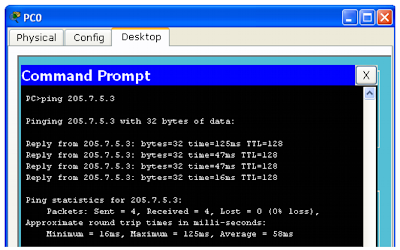
PC>ping 205.7.5.3
Pinging 205.7.5.3 with 32 bytes of data:
Reply from 205.7.5.3: bytes=32 time=8ms TTL=128
Reply from 205.7.5.3: bytes=32 time=4ms TTL=128
Reply from 205.7.5.3: bytes=32 time=4ms TTL=128
Reply from 205.7.5.3: bytes=32 time=4ms TTL=128
Ping statistics for 205.7.5.3:
Packets: Sent = 4, Received = 4,
Lost = 0 (0% loss),
Approximate round trip times in milli-seconds:
Minimum = 4ms, Maximum = 8ms,
Average = 5ms
PC>ping 192.5.5.2
Pinging 192.5.5.2 with 32 bytes of data:
Reply from 192.5.5.2: bytes=32 time=8ms TTL=127
Reply from 192.5.5.2: bytes=32 time=8ms TTL=127
Reply from 192.5.5.2: bytes=32 time=8ms TTL=127
Reply from 192.5.5.2: bytes=32 time=8ms TTL=127
Ping statistics for 192.5.5.2:
Packets: Sent = 4, Received = 4,
Lost = 0 (0% loss),
Approximate round trip times in milli-seconds:
Minimum = 8ms, Maximum = 8ms,
Average = 8ms
PC>ping 192.5.5.3
Pinging 192.5.5.3 with 32 bytes of data:
Reply from 192.5.5.3: bytes=32 time=8ms TTL=127
Reply from 192.5.5.3: bytes=32 time=8ms TTL=127
Reply from 192.5.5.3: bytes=32 time=8ms TTL=127
Reply from 192.5.5.3: bytes=32 time=8ms TTL=127
Ping statistics for 192.5.5.3:
Packets: Sent = 4, Received = 4,
Lost = 0 (0% loss),
Approximate round trip times in milli-seconds:
Minimum = 8ms, Maximum = 8ms,
Average = 8ms
PC>ping
219.17.100.2
Pinging 219.17.100.2 with 32 bytes of data:
Reply from 219.17.100.2: bytes=32 time=125ms TTL=126
Reply from 219.17.100.2: bytes=32 time=203ms TTL=122
Reply from 219.17.100.2: bytes=32 time=203ms TTL=122
Reply from 219.17.100.2: bytes=32 time=188ms TTL=122
Ping statistics for 219.17.100.2:
Packets: Sent = 4, Received = 4,
Lost = 0 (0% loss),
Approximate round trip times in milli-seconds:
Minimum = 125ms, Maximum = 203ms,
Average = 179ms
PC>ping
219.17.100.3
Pinging 219.17.100.3 with 32 bytes of data:
Reply from 219.17.100.3: bytes=32 time=188ms TTL=122
Reply from 219.17.100.3: bytes=32 time=200ms TTL=122
Reply from 219.17.100.3: bytes=32 time=187ms TTL=122
Reply from 219.17.100.3: bytes=32 time=156ms TTL=122
Ping statistics for 219.17.100.3:
Packets: Sent = 4, Received = 4,
Lost = 0 (0% loss),
Approximate round trip times in milli-seconds:
Minimum = 156ms, Maximum = 200ms,
Average = 182ms
PC>ping
223.8.151.2
Pinging 223.8.151.2 with 32 bytes of data:
Reply from 223.8.151.2: bytes=32 time=219ms TTL=123
Reply from 223.8.151.2: bytes=32 time=187ms TTL=123
Reply from 223.8.151.2: bytes=32 time=156ms TTL=123
Reply from 223.8.151.2: bytes=32 time=202ms TTL=123
Ping statistics for 223.8.151.2:
Packets: Sent = 4, Received = 4,
Lost = 0 (0% loss),
Approximate round trip times in milli-seconds:
Minimum = 156ms, Maximum = 219ms,
Average = 191ms
PC>ping
223.8.151.3
Pinging 223.8.151.3 with 32 bytes of data:
Reply from 223.8.151.3: bytes=32 time=219ms TTL=123
Reply from 223.8.151.3: bytes=32 time=203ms TTL=123
Reply from 223.8.151.3: bytes=32 time=204ms TTL=123
Reply from 223.8.151.3: bytes=32 time=153ms TTL=123
Ping statistics for 223.8.151.3:
Packets: Sent = 4, Received = 4,
Lost = 0 (0% loss),
Approximate round trip times in milli-seconds:
Minimum = 153ms, Maximum = 219ms,
Average = 194ms
PC>ping
210.93.105.3
Pinging 210.93.105.3 with 32 bytes of data:
Reply from 210.93.105.3: bytes=32 time=250ms TTL=124
Reply from 210.93.105.3: bytes=32 time=174ms TTL=124
Reply from 210.93.105.3: bytes=32 time=136ms TTL=124
Reply from 210.93.105.3: bytes=32 time=203ms TTL=124
Ping statistics for 210.93.105.3:
Packets: Sent = 4, Received = 4,
Lost = 0 (0% loss),
Approximate round trip times in milli-seconds:
Minimum = 136ms, Maximum = 250ms,
Average = 190ms
PC>ping
210.93.105.4
Pinging 210.93.105.4 with 32 bytes of data:
Reply from 210.93.105.4: bytes=32 time=172ms TTL=124
Reply from 210.93.105.4: bytes=32 time=190ms TTL=124
Reply from 210.93.105.4: bytes=32 time=152ms TTL=124
Reply from 210.93.105.4: bytes=32 time=216ms TTL=124
Ping statistics for 210.93.105.4:
Packets: Sent = 4, Received = 4,
Lost = 0 (0% loss),
Approximate round trip times in milli-seconds:
Minimum = 152ms, Maximum = 216ms,
Average = 182ms
Gambarnya :
 sumber : @ berbagi